

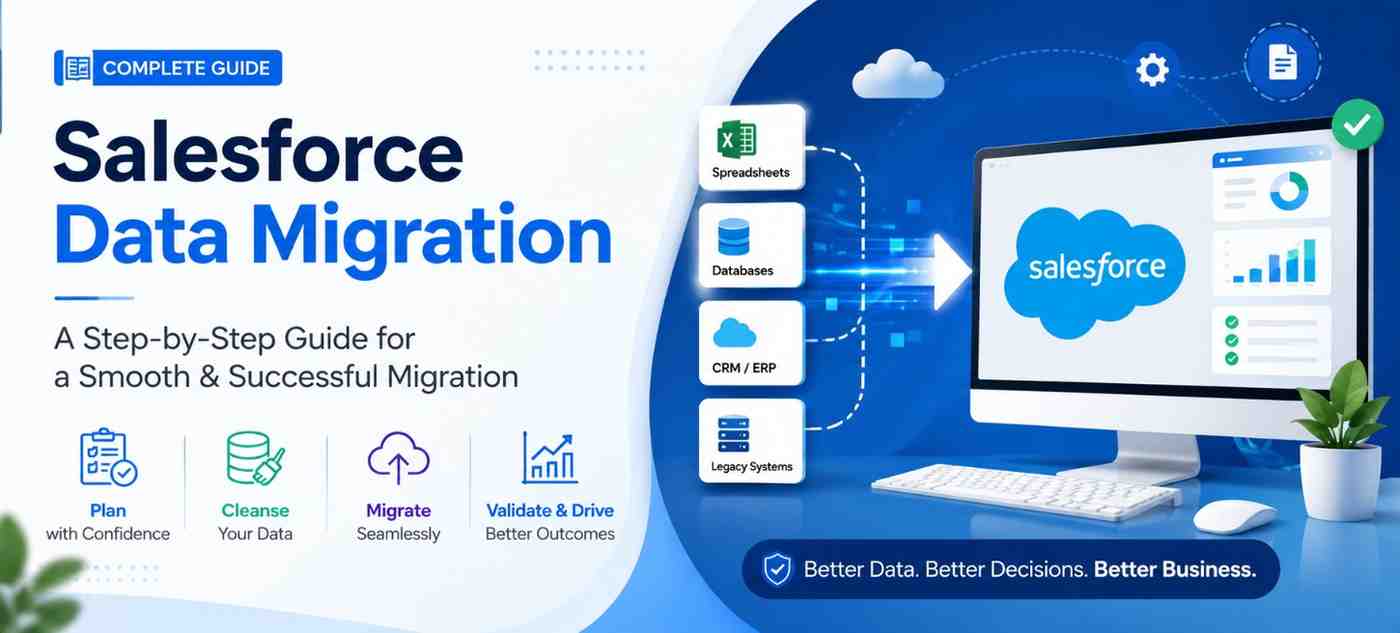
Most businesses don’t start looking for Salesforce data migration because they want a new CRM. They start looking because their existing systems are no longer supporting the way the business operates.
It often begins with small challenges. Sales teams struggle to find accurate customer information. Marketing works with outdated contact lists. Customer support relies on incomplete records, while managers spend more time verifying reports than making decisions. As the business grows, these issues become difficult to ignore.
Moving to Salesforce can solve many of these problems, but only when the migration is carefully planned. Simply transferring records from one system to another doesn’t guarantee better data quality or improved business performance. In fact, migrating poor-quality data into a new CRM can create the same problems in a different platform.
Over the years, we’ve noticed that successful Salesforce migration projects aren’t defined by how quickly the data is moved. They’re defined by how well the data supports the people using Salesforce after go-live. The businesses that see the best results usually spend more time reviewing, cleaning and validating their data than actually migrating it.
This guide explains the complete Salesforce data migration process from a business perspective. Whether you’re moving from another CRM, an ERP system, spreadsheets or a legacy application, you’ll learn how to plan your migration, avoid common mistakes and build a reliable Salesforce environment that supports future growth.
What Is Salesforce Data Migration?
Salesforce data migration is the process of transferring business data from an existing CRM, ERP, database, spreadsheet or legacy system into Salesforce while preserving data accuracy, relationships and business continuity. A successful migration involves much more than importing records, it includes data assessment, cleanup, mapping, validation and testing to ensure your teams can confidently use Salesforce from day one.
Expert Insight: One of the biggest misconceptions we encounter is that Salesforce migration is primarily a technical task. In reality, it’s a business transformation project. The quality of your planning, data preparation and user validation usually has a greater impact on project success than the migration tool you choose.
Why Businesses Decide to Migrate to Salesforce
Every Salesforce migration project starts with a different challenge, but the goal is usually the same: creating a single, reliable source of customer information that supports better business decisions.
Some businesses have simply outgrown their existing CRM. What worked well for a small sales team may no longer support multiple departments, larger customer databases or more complex sales processes. Others rely on spreadsheets or disconnected applications that make it difficult to track customer interactions, forecast revenue or generate meaningful reports.
We’ve also worked with organisations where customer information was spread across different systems. Sales, marketing and customer support each maintained separate records, resulting in duplicate data, inconsistent reporting and time-consuming manual updates. Instead of helping teams work together, the CRM had become another operational challenge.
Salesforce offers businesses an opportunity to centralise customer data, automate routine processes and improve visibility across the entire customer lifecycle. However, these benefits don’t come from the migration itself, they come from migrating the right data in the right way.
Before starting any migration project, we encourage businesses to step back and ask a simple question:
Are we moving data because we’re changing software or because we’re trying to improve the way our business operates?
The answer to that question often shapes every decision that follows.
Common business scenarios that lead to Salesforce migration include:
- Your existing CRM no longer supports business growth.
- Customer data is spread across multiple systems.
- Reporting is inconsistent or unreliable.
- Manual processes consume valuable time.
- Sales, marketing and support teams work with different customer records.
- Legacy systems are expensive to maintain or difficult to integrate.
- Business mergers or acquisitions require data consolidation.
- Leadership needs better visibility into sales performance and customer relationships.
During migration planning, we often discover that the CRM isn’t the real problem. The real issue is inconsistent data management over time. Duplicate records, outdated information and disconnected processes gradually reduce trust in the system. A Salesforce migration provides an opportunity not only to move data but also to improve its quality, simplify business processes and establish stronger data governance for the future.
Understanding the Different Types of Salesforce Data Migration
No two Salesforce migration projects are exactly the same. The source system, business goals, data quality and level of customization all influence the migration approach.
One mistake we often see is assuming that every migration follows the same process. In reality, moving customer records from spreadsheets is very different from migrating years of business data from a CRM or ERP platform. Each scenario requires a different level of planning, validation and testing.
Understanding the type of migration your business needs is one of the first steps toward choosing the right migration strategy, estimating project timelines and avoiding unnecessary risks.
| Migration Type | Best For | Business Complexity |
| CRM to Salesforce Migration | Businesses replacing an existing CRM | Medium to High |
| ERP to Salesforce Migration | Organizations connecting sales with finance and operations | High |
| Ecommerce to Salesforce Migration | Online stores using platforms like Shopify, Magento or WooCommerce | Medium |
| Spreadsheet (Excel/CSV) Migration | Small businesses moving from manual data management | Low |
| Database Migration | Businesses using SQL or custom databases | Medium to High |
| Legacy System Migration | Organizations replacing outdated business software | High |
| Salesforce Org-to-Org Migration | Businesses restructuring or merging Salesforce environments | Medium |
Rather than viewing these as technical projects, think of them as different business transformation journeys. Each migration has its own objectives, risks and success criteria.
CRM to Salesforce Migration
For many businesses, Salesforce becomes the next step after their existing CRM can no longer support business growth. Whether you’re using HubSpot, Zoho CRM, Microsoft Dynamics 365, Pipedrive, Freshsales or another CRM platform, the goal isn’t simply to move contacts and opportunities. It’s to preserve valuable customer relationships while improving how your teams work.
A CRM migration often involves:
- Customer and company records
- Leads and opportunities
- Sales activities and notes
- Tasks and appointments
- Custom fields
- Reports and dashboards
- Workflow considerations
One challenge businesses frequently underestimate is the difference in how each CRM stores data. Fields, record relationships and automation rules rarely match perfectly. Without proper planning, businesses may end up with incomplete reports or processes that no longer work as expected after migration.
From Our Experience: During CRM migration projects, we rarely recommend moving every historical record into Salesforce. Instead, we help clients identify which information actively supports sales, customer service and reporting. Starting with clean, relevant data usually improves adoption and reduces long-term CRM maintenance.
ERP to Salesforce Migration
ERP systems often contain valuable customer, product, pricing and order information that sales teams need access to. Migrating or synchronizing selected ERP data with Salesforce helps create a more complete view of each customer without forcing teams to switch between multiple applications.
Depending on business requirements, an ERP migration may include:
- Customer accounts
- Product catalogues
- Quotes
- Order history
- Invoice references
- Pricing information
- Contract details
Because ERP systems manage operational and financial data, these projects generally require additional planning, data governance and validation to maintain business continuity.
Ecommerce Data Migration
For ecommerce businesses, Salesforce is often introduced to improve customer engagement rather than replace the ecommerce platform itself.
Instead of managing customer information separately in Shopify, Magento, WooCommerce or BigCommerce, businesses use Salesforce to create a unified customer profile that combines purchasing behaviour, marketing interactions and support history.
A typical ecommerce migration may include:
- Customer profiles
- Orders
- Products
- Shopping behaviour
- Loyalty information
- Marketing preferences
When planned correctly, this enables better personalization, improved customer support and more informed sales and marketing decisions.
Spreadsheet and CSV Migration
Many growing businesses start by managing customer information in Excel or CSV files. While this approach works initially, it becomes difficult to maintain data accuracy as the business expands.
Spreadsheet migrations are generally less complex than CRM migrations, but they still require careful preparation. Duplicate records, inconsistent formatting, missing values and outdated information can all affect the quality of the data imported into Salesforce.
Before importing spreadsheet data, we usually recommend reviewing:
- Duplicate contacts
- Email formatting
- Phone number consistency
- Company naming conventions
- Required Salesforce fields
- Data ownership
A few hours spent cleaning spreadsheet data often saves days of correction work after migration.
Legacy System Migration
Some organizations continue using internally developed or older business applications that no longer meet current operational needs. These systems often contain years of valuable customer information, but extracting and restructuring that data can be one of the most challenging parts of the migration.
Legacy migrations typically require:
- Data discovery
- Field mapping
- Data transformation
- Quality validation
- Historical data review
Since documentation is often limited, these projects benefit from additional planning before any records are transferred.
Salesforce Org-to-Org Migration
Businesses don’t always migrate into Salesforce from another platform. In some cases, they need to consolidate multiple Salesforce organizations following a merger, acquisition, business restructuring or regional expansion.
Although both systems use Salesforce, these migrations can still involve significant complexity due to differences in custom objects, automation, security models, integrations and reporting structures.
Successful Org-to-Org migrations focus not only on moving records but also on preserving business processes while reducing unnecessary customization.
Consultant’s Perspective: Every Migration Doesn’t Need Every Record
One conversation we have quite often is:
“Should we migrate all our historical data?”
The answer is usually “Not necessarily.”
Many businesses assume that every record created over the last ten years should move into Salesforce. However, after reviewing how different teams actually use the CRM, it’s common to find large volumes of inactive contacts, closed opportunities, duplicate companies or outdated information that no longer supports daily operations.
Rather than asking “What can we migrate?”, a better question is:
What data will help our business make better decisions after migration?”
That shift in thinking often results in cleaner reports, faster Salesforce performance, improved user adoption and a simpler CRM environment that’s easier to maintain over time.
How to Plan a Salesforce Data Migration Without Disrupting Your Business
By the time a business decides to move to Salesforce, there’s usually a sense of urgency. Teams want better reporting, cleaner customer data and a CRM that can support future growth. It’s tempting to jump straight into the migration process, but this is where many projects begin to lose momentum.
In our experience, successful Salesforce migrations are rarely the result of moving data quickly. They’re the result of making informed decisions before the first record is migrated.
The planning phase isn’t just about technology. It’s about understanding how your business works today, what needs to improve tomorrow and ensuring Salesforce supports those goals from day one.
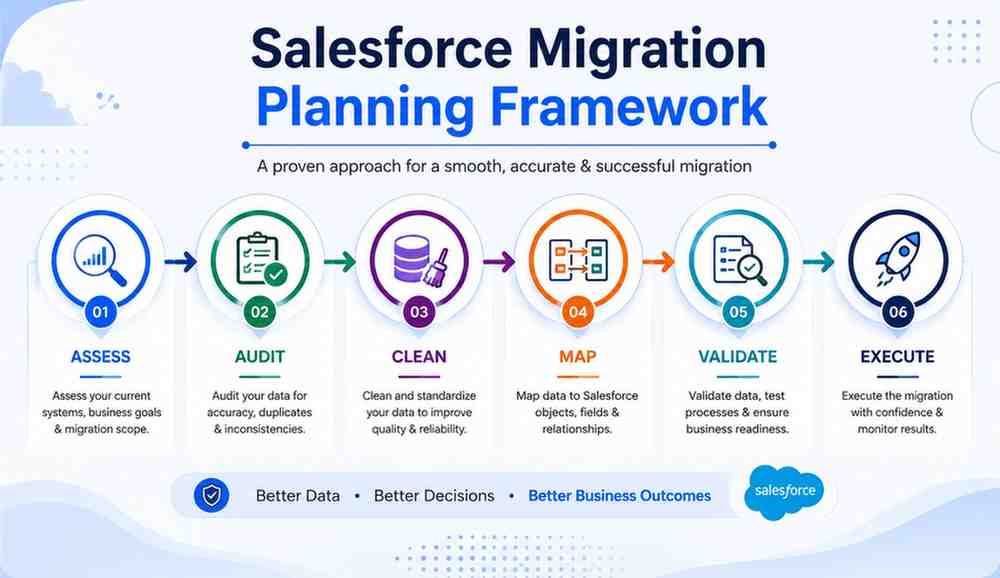
Start With Business Goals, Not the Migration Tool
One of the first conversations we have with clients isn’t about Salesforce or migration tools, it’s about business objectives.
Questions like these help shape the entire migration strategy:
- Why are you moving to Salesforce now?
- What business problems are you trying to solve?
- Which departments will use Salesforce every day?
- What reports or dashboards are critical for management?
- How will you measure the success of this migration six months after go-live?
The answers often reveal that the migration itself isn’t the primary objective. Businesses are looking for better visibility, improved collaboration, automated processes or a more reliable customer database.
When those goals are clearly defined, every migration decision becomes easier, from deciding what data to move to determining which workflows should be rebuilt in Salesforce.
Understand Your Existing Data Before Moving It
A common misconception is that every record in the current system deserves a place in Salesforce. In reality, years of business growth often leave behind duplicate contacts, inactive customers, outdated opportunities and inconsistent information.
Migrating this data without reviewing it simply transfers old problems into a new CRM.
Before creating a migration plan, it’s worth understanding the current state of your data.
Ask questions such as:
- Which records are actively used by your teams?
- Which data is outdated or duplicated?
- Are required fields consistently populated?
- Do customer records follow the same naming standards?
- Which custom fields are still relevant?
This review not only improves data quality but also makes reporting more reliable after migration.
Consultant’s Insight: We’ve seen businesses reduce migration effort significantly simply by reviewing inactive records before the project begins. A smaller, cleaner dataset is easier to validate, easier for users to trust and much easier to maintain in the long run.
Involve the Right People Early
A Salesforce migration isn’t an IT-only initiative.
Sales teams know which customer information they rely on every day. Marketing understands campaign data and lead sources. Customer support depends on service history, while leadership expects reports that reflect the true state of the business.
Bringing these stakeholders into the planning phase helps uncover important requirements that might otherwise be missed.
| Team | Why Their Input Matters |
| Sales | Customer records, opportunities, activities |
| Marketing | Lead sources, campaign history, segmentation |
| Customer Support | Cases, service history, response tracking |
| Finance | Customer accounts, billing references (where applicable) |
| Operations | Business workflows and approvals |
| Leadership | Reporting, dashboards and performance metrics |
A migration planned collaboratively is far less likely to require major corrections after go-live.
Create a Clear Data Mapping Strategy
One of the most overlooked parts of Salesforce data migration is deciding where every piece of information should live in the new CRM.
Different systems often use different field names, structures and relationships. Simply matching fields with similar names can create reporting issues and incomplete customer records later.
A proper mapping exercise should answer questions like:
- Which fields match Salesforce standard objects?
- Which information belongs in custom fields?
- Are there fields that are no longer required?
- How should related records connect after migration?
- Will any business processes change once Salesforce is live?
Good data mapping isn’t just about transferring information, it’s about making sure users can easily find and trust that information after migration.
Build a Realistic Migration Timeline
Every business wants a quick migration, but speed should never come at the expense of accuracy.
The timeline depends on factors such as:
- The amount of data being migrated
- Number of source systems
- Data quality
- Custom objects and fields
- Existing integrations
- Internal review and testing cycles
Instead of committing to a single migration weekend from the beginning, many businesses benefit from breaking the project into manageable phases.
A phased approach gives teams time to validate data, resolve issues and become familiar with Salesforce before the entire business transitions to the new platform.
Prepare a Backup and Rollback Plan
No migration project should begin without a backup strategy.
Even well-planned migrations can uncover unexpected issues, whether it’s incomplete records, field mapping errors or integration conflicts.
A backup ensures that original business data remains protected, while a rollback plan provides confidence that operations can continue if adjustments are needed before the final migration is approved.
Think of it as business continuity rather than disaster recovery. The objective isn’t expecting failure, it’s being prepared for it.
Don’t Forget About User Adoption
Many migration projects are considered complete once the data appears in Salesforce.
In reality, that’s only the beginning.
The real measure of success is whether employees feel confident using the new system in their daily work.
Before go-live, consider questions such as:
- Do users understand the new data structure?
- Have key reports been verified?
- Are dashboards showing accurate information?
- Do teams know where to find customer records?
- Has basic Salesforce training been completed?
A technically successful migration can still fail if users don’t trust or adopt the new CRM.
From Our Experience:
We’ve found that businesses with the smoothest Salesforce transitions spend time introducing users to the new CRM before go-live, not after. Even a short orientation session helps teams understand new processes, identify questions early and start using Salesforce with greater confidence from day one.
Planning Checklist Before You Start the Migration
Before moving any data into Salesforce, make sure your team can confidently answer the following questions:
✔ Have we clearly defined why we’re migrating?
✔ Do we know which data should be migrated and which can be archived?
✔ Have duplicate and outdated records been reviewed?
✔ Are all business stakeholders involved in planning?
✔ Has data mapping been completed and reviewed?
✔ Do we have a realistic project timeline?
✔ Is a backup and rollback plan in place?
✔ Have we planned user testing and training?
If the answer to most of these questions is yes, your migration project is already on a much stronger foundation than many businesses achieve before they begin.
Executing & Validating Your Salesforce Data Migration
Planning gives your migration project direction, but execution is where every decision is put to the test. This is the stage where customer records, sales data, products, activities and other business information begin moving into Salesforce.
While the technical process may only take hours or days, a successful migration is measured by something much more important, whether your teams can rely on Salesforce with confidence once the project is complete.
The objective isn’t simply to move data from one system to another. It’s to ensure the information arriving in Salesforce is complete, accurate and ready to support day-to-day business operations.
Think Beyond Data Transfer
One of the biggest misconceptions about Salesforce migration is that success depends on whether all records are imported successfully.
In reality, successful execution means much more than achieving a 100% import rate.
Your sales team should still be able to manage opportunities without interruption.
Marketing should continue tracking campaigns and lead sources accurately.
Customer support should have access to the service history they rely on every day.
Management should trust the reports and dashboards they use to make business decisions.
If the data has been transferred but these business processes no longer work as expected, the migration cannot be considered complete.
Why Testing Before Go-Live Matters
Before making Salesforce available to the entire organization, it’s important to test the migration in a controlled environment.
Rather than importing every record directly into your production environment, businesses should first validate how data behaves in a testing or sandbox environment.
This allows your team to confirm that:
- Customer records appear correctly.
- Related records remain connected.
- Required fields are populated.
- Reports display accurate information.
- Dashboards reflect expected business metrics.
- Automations continue to work as intended.
Testing provides an opportunity to identify issues before they affect everyday operations.
From Our Experience: We’ve found that testing often uncovers issues that aren’t visible during planning. Something as simple as inconsistent country names, outdated product codes or missing ownership information can create reporting problems later. Identifying these issues before go-live is significantly easier than correcting them after users have already started working in Salesforce.
Validate the Data: Not Just the Record Count
Many migration projects end with one simple question:
“Did all the records move successfully?”
While record counts are important, they only tell part of the story.
Data validation should focus on whether Salesforce reflects the way your business actually works.
A thorough validation process should confirm:
| Validation Area | Why It Matters |
| Customer Records | Ensure customer information is complete and accurate. |
| Related Data | Verify contacts, opportunities, products and activities remain connected. |
| Reports & Dashboards | Confirm business insights match expected results. |
| Automation | Check workflows, approvals and notifications function correctly. |
| User Permissions | Make sure employees can access the right information. |
| Custom Fields | Verify important business data has been migrated correctly. |
This level of validation helps ensure Salesforce is ready for everyday business use rather than simply acting as a storage location for imported records.
Give Business Users the Opportunity to Review the Data
Migration projects shouldn’t be signed off by the technical team alone.
The people who work with customer data every day are often the first to notice missing information, incorrect values or unexpected changes.
Encourage representatives from sales, marketing, customer service and operations to review the migrated data before the project is considered complete.
Ask questions such as:
- Can you find your customers easily?
- Do opportunities display correctly?
- Are reports showing expected numbers?
- Is customer history available where needed?
- Are daily tasks easier or more difficult than before?
Their feedback provides valuable confirmation that Salesforce is supporting real business processes, not just technical requirements.
Don’t Rush the Go-Live Decision
Once the data looks accurate, there can be pressure to switch everyone over to Salesforce immediately.
While enthusiasm is understandable, taking a little extra time for final validation often prevents much larger issues later.
Before approving go-live, confirm that:
- Critical reports have been reviewed.
- Key users have completed testing.
- Automation is functioning correctly.
- Integrations are operating as expected.
- Business teams understand new processes.
- Backup copies remain available if required.
Go-live should feel like a planned transition, not an experiment.
Common Salesforce Data Migration Challenges (and How to Avoid Them)
Every Salesforce migration project presents its own challenges. Some are technical, while others are caused by business processes that have evolved over time.
The good news is that many of these challenges can be identified early with proper planning and stakeholder involvement.
Here are some of the issues we see most often.
Migrating Too Much Historical Data
It’s natural to assume that every record should be transferred to the new CRM.
However, carrying years of outdated contacts, inactive accounts and duplicate information into Salesforce often creates unnecessary complexity.
A more effective approach is to review which data actively supports your business today and archive information that no longer provides operational value.
Poor Data Quality
No migration tool can automatically correct inaccurate or inconsistent data.
Duplicate customer records, incomplete contact details and inconsistent naming conventions often reduce reporting accuracy after migration.
Investing time in data cleanup before migration almost always delivers better long-term results.
Underestimating Business Process Changes
Moving to Salesforce isn’t only about transferring data.
Teams may need to adapt to new workflows, updated approval processes, different reports or changes in how customer information is managed.
Preparing users for these changes improves adoption and reduces resistance after go-live.
Limited Stakeholder Involvement
When migration decisions are made by a small technical team, important business requirements can easily be overlooked.
Involving department leaders early helps ensure Salesforce supports the needs of every team that relies on customer information.
Rushing User Acceptance Testing
Businesses sometimes view testing as the final administrative task before launch.
In reality, User Acceptance Testing (UAT) is one of the most valuable opportunities to confirm that Salesforce works as expected in real business scenarios.
Encouraging users to complete common day-to-day tasks before go-live often reveals issues that automated testing cannot detect.
Consultant’s Perspective
Looking back at different Salesforce migration projects, the biggest challenges are rarely caused by Salesforce itself. More often, they stem from inconsistent data, unclear business processes or assumptions made during planning. The businesses that achieve the smoothest migrations usually invest more effort in preparation, validation and user involvement than in the migration technology itself.
Key Takeaways
Before considering your Salesforce migration complete, remember these principles:
- Focus on business continuity, not just data transfer.
- Test your migration before going live.
- Validate business processes, reports and automation, not only record counts.
- Give business users time to review the migrated data.
- Treat go-live as the beginning of user adoption, not the end of the project.
- Resolve data quality issues before they become Salesforce issues.
What We’ve Learned from Salesforce Data Migration Projects
Every Salesforce migration project is different, but one thing has remained consistent throughout our experience: the businesses that achieve the best outcomes don’t necessarily have the most advanced technology, they have the clearest migration strategy.
Over the years, we’ve worked with organizations migrating from spreadsheets, legacy applications and established CRM platforms. While each project had its own technical requirements, the biggest challenges were rarely related to Salesforce itself.
More often, the real challenges involved understanding existing business processes, improving data quality, aligning different departments and deciding what information would continue to deliver value after the migration.
We’ve also learned that successful migrations aren’t measured by how many records are transferred. They’re measured by how confidently sales, marketing, customer service and leadership teams can rely on Salesforce once it becomes their primary CRM.
Businesses that invest time in planning, reviewing data and validating business processes before go-live typically experience a smoother transition and stronger user adoption. On the other hand, organizations that rush into migration without addressing data quality or involving key stakeholders often spend more time fixing issues after implementation than they would have spent preventing them.
Perhaps the most valuable lesson is that Salesforce data migration should never be treated as a standalone technical project. It’s an opportunity to improve how customer information is managed, strengthen
How to Measure Whether Your Salesforce Migration Was Successful
Many businesses measure migration success by asking a single question:
“Did all the data move successfully?”
While that’s important, it’s only one part of the picture.
A more meaningful approach is to evaluate how Salesforce is performing after the migration.
Consider reviewing outcomes such as:
| Success Indicator | Questions to Ask |
| User Adoption | Are employees actively using Salesforce in their daily work? |
| Data Accuracy | Can teams trust the customer information they rely on? |
| Reporting | Do dashboards and reports reflect the correct business performance? |
| Process Efficiency | Have manual tasks or duplicate work been reduced? |
| Customer Experience | Can teams access customer information more quickly? |
| Business Visibility | Does leadership have better insights for decision-making? |
If these areas show measurable improvement, your migration has likely achieved far more than simply moving records, it has strengthened the way your business manages customer relationships.
Before You Start Your Salesforce Migration, Ask These Questions
Before approving any migration project, it’s worth taking a step back and discussing a few important questions with your team.
- Why are we migrating now and what business outcome are we expecting?
- Which data supports current business operations and which data can be archived?
- Have we involved every department that depends on customer information?
- Are our reporting requirements clearly defined?
- Have we planned enough time for testing and user validation?
- What does success look like three months after go-live?
These conversations often uncover opportunities and risks that may not be obvious during technical planning alone.
Final Thoughts
Salesforce data migration is much more than a technology upgrade. It’s an opportunity to improve data quality, simplify business processes and create a stronger foundation for future growth.
Businesses that achieve the best results rarely focus on moving the largest amount of data or completing the project in the shortest time. Instead, they focus on planning carefully, involving the right people, validating every stage of the migration and ensuring Salesforce supports the way their teams actually work.
Whether you’re migrating from another CRM, an ERP platform, spreadsheets or legacy system, success depends on making informed business decisions long before the first record is transferred.
With the right strategy, Salesforce becomes more than a place to store customer data, it becomes a platform that helps your teams work smarter, collaborate better and make more confident business decisions.
Need Expert Guidance for Your Salesforce Data Migration?
Every migration project is different. The right approach depends on your existing systems, data quality, business processes and long-term goals.
If you’re planning a Salesforce migration and want to reduce risk, improve data quality and ensure a smooth transition, working with an experienced Salesforce consulting partner can help you plan, execute and validate your migration with confidence.
Our expert team works closely with businesses to design migration strategies that support long-term CRM success, not just successful data imports.
Frequently Asked Questions About Salesforce Data Migration
Q. What is Salesforce data migration?
Salesforce data migration is the process of transferring customer and business data from an existing CRM, ERP, spreadsheet, database or legacy system into Salesforce. A successful migration includes data cleanup, mapping, validation and testing to ensure the new CRM is accurate and ready for daily business operations.
Q. Why do businesses migrate to Salesforce?
Businesses migrate to Salesforce to centralize customer data, improve reporting, automate sales and service processes and support business growth. Many organizations also migrate because their existing CRM or manual systems no longer meet operational requirements.
Q. What data can be migrated to Salesforce?
Most business data can be migrated, including accounts, contacts, leads, opportunities, products, activities, cases, attachments and custom objects. The exact data depends on your existing system and business requirements.
Q. How long does a Salesforce data migration take?
The timeline varies based on data volume, data quality, customizations, integrations and testing requirements. Small projects may take a few weeks, while larger enterprise migrations can take several months.
Q. Will I lose data during the migration?
A well-planned Salesforce migration should not result in data loss. Creating backups, validating records and testing the migration before go-live help ensure your business data is transferred safely and accurately.
Q. Should I migrate all my historical data?
Not always. Many businesses choose to migrate only active and relevant data while archiving older records. This approach improves data quality, simplifies reporting and keeps Salesforce easier to manage.
Q. What are the biggest challenges in Salesforce data migration?
Common challenges include poor data quality, duplicate records, incorrect field mapping, broken integrations and limited user involvement. Most of these risks can be reduced with proper planning and thorough validation.
Q. How do I know if my Salesforce migration was successful?
A successful migration goes beyond moving data. Your teams should be able to trust customer records, generate accurate reports, use business processes without interruption and confidently adopt Salesforce for their daily work.
Q. Should I use a migration tool or work with a Salesforce consulting partner?
Migration tools help transfer data, but they don’t define your migration strategy or business processes. For straightforward projects, a tool may be enough. For complex CRM, ERP or multi-system migrations, working with an experienced Salesforce consulting partner can help reduce risks and improve long-term outcomes.
Q. What should I do before starting a Salesforce migration?
Start by defining your business goals, reviewing existing data, removing duplicate records, identifying key stakeholders, planning your migration strategy and creating a backup. Good preparation significantly improves the chances of a successful migration.